
Set up Samsung & LG TVs
Set up your device with Smart STB, a third-party player.

Installation steps
-
Install Smart STB on your TV
Search for Smart STB in Apps on Samsung or find Smart STB in the LG Content Store on your LG webOS TV. Select Install. Availability varies by TV model and region.
-
Find your Virtual MAC or portal QR code
Open Smart STB. In Device info, look for the yellow Your Virtual MAC line or the QR code labeled Scan to edit portals. If Device info is hidden, open System settings → Device info.
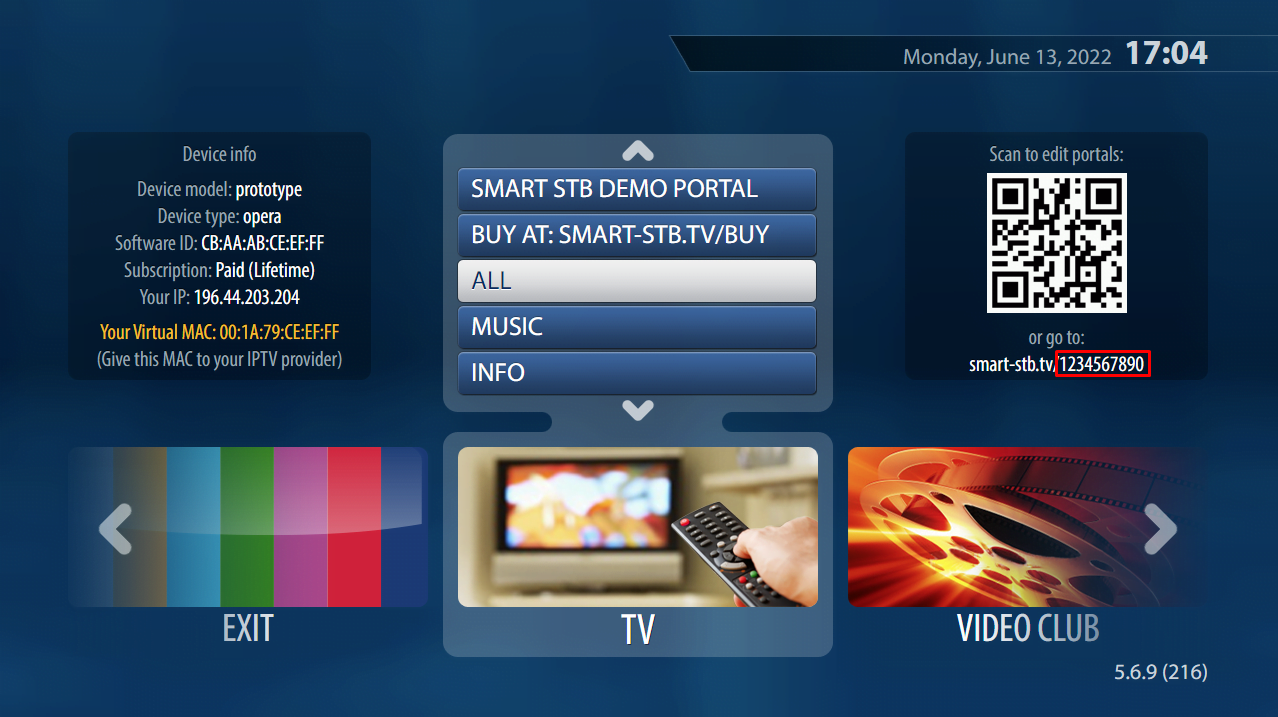
Example screen. Use the Virtual MAC or QR code shown on your own TV. -
Send your setup details
Send your Virtual MAC or a clear picture of the full portal QR code and settings code. We’ll help connect your portal.
Message us on WhatsApp ↗